How to Choose a Home Laser Cutter Machine in 2026?

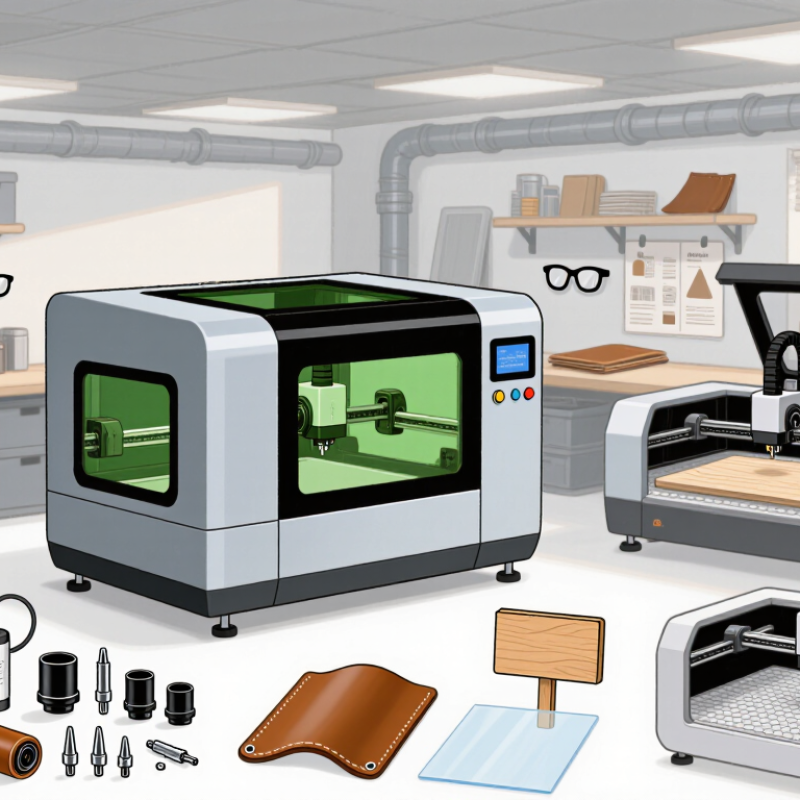
Choosing a home laser cutter machine in 2026 is not simply a matter of buying more power. Your workspace, materials, ventilation, software, and safety habits matter just as much. A compact diode laser may suit small wooden signs, leather crafts, and occasional engraving. A CO2 machine may handle thicker wood and acrylic more efficiently. The right choice depends on what you will actually make.

Russ Sadler, a long-time laser educator and machine builder, says, “The laser is only one part of the system.” That warning deserves attention. A machine can look impressive online, yet disappoint in a crowded room with poor extraction. Check the working area carefully. A 400 × 400 millimeter bed may feel generous until you design a large wall sign. Examine autofocus, air assist, enclosure quality, emergency stops, and replacement-part access. These details become very real after the first burnt edge.

Material compatibility also requires honest thinking. Never assume every plastic is safe to cut. PVC and unknown composites can release dangerous gases. Use documented materials, proper ventilation, eye protection, and manufacturer-approved settings. Local safety requirements may also apply. Certification is useful, but it does not replace responsible operation.

This guide compares practical machine types, usable power, software support, maintenance, noise, and total ownership cost. Some recommendations will remain imperfect, because no single home laser cutter machine fits every workshop. Your budget may force compromises. That is normal. The goal is not the fastest machine, but a reliable tool you can operate safely and use consistently.

How to Choose a Home Laser Cutter Machine in 2026?

What a Home Laser Cutter Is and How It Works

How to Choose a Home Laser Cutter Machine in 2026?

A home laser cutter is a computer-controlled tool that removes, marks, or cuts material with concentrated light. A lens focuses the beam into a tiny, extremely hot point. The machine follows digital paths from design software. Vector paths usually cut outlines. Raster movements create shaded engraving.

There are practical differences between laser types. Diode lasers suit thin wood, paper, and some coated surfaces. CO2 systems usually handle wood, acrylic, and cardboard more effectively. Fiber systems target metals, but they are rarely sensible for ordinary home workshops.

According to Grand View Research, the global laser cutting machine market was valued at about 5.86 billion dollars in 2023. The report forecasts a 7.1% compound annual growth rate through 2030. That growth does not mean every household needs maximum power.

In a small room, enclosure design matters as much as wattage. A useful test is simple: check the viewing window, exhaust route, emergency stop, and lid interlock.

The IEC 60825-1 safety standard classifies laser hazards, so certification details deserve careful attention. Never cut unknown plastics, PVC, or heavily treated materials. They may release corrosive or toxic fumes.

Keep the machine supervised. Even a short unattended job can fail.

I once underestimated ventilation.

A weaker machine can be the wiser choice. It may cut more slowly, but it often costs less, uses less space, and teaches better control.

The imperfect part is material testing. Settings rarely transfer perfectly between sheets, even when they look identical. Record speed, power, passes, and surface results before repeating a project.

How to Match Laser Type and Power to Your Projects

How to Choose a Home Laser Cutter Machine in 2026?

Laser type should follow your material, not online power claims. A diode laser usually delivers 5–20 watts of optical power. It suits plywood, cardboard, leather, and dark-coated surfaces. However, it often struggles with clear acrylic and transparent materials. A CO2 laser, commonly rated at 40–80 watts, cuts wood and acrylic more efficiently. Its 10.6-micrometer wavelength is unsuitable for most bare metals. Fiber lasers operate near 1.06 micrometers and are designed for metal marking or cutting, but their cost, enclosure, and ventilation needs rarely suit casual home workshops.

Match power to thickness and production speed. For 3-millimeter plywood, a 10–20-watt diode may work through several passes. A 60-watt CO2 machine can usually cut faster and cleaner. Results still depend on focus, air assistance, moisture, and material density. Small differences matter. Do not trust wattage alone.

Market data shows why home machines are diversifying. Grand View Research estimated the global laser cutting machine market at roughly 7 billion U.S. dollars in 2023. Fortune Business Insights also forecasts strong growth through the next decade, although estimates differ by research method. That disagreement is worth noticing. For home use, prioritize certified guarding, exhaust filtration, flame monitoring, and accessible emergency stops. Test scraps first, record settings, and avoid materials with unknown coatings. A cheaper machine may become expensive when ventilation and maintenance are added.

Which Materials and Cutting Sizes Fit Your Needs

Choosing a home laser cutter begins with the material you will actually use. Wood, paper, cardboard, leather, and some acrylic sheets are common choices. Yet thickness matters more than attractive sample projects. Thin plywood may cut cleanly, while dense hardwood can require several passes. Clear acrylic usually needs a different laser type than opaque plastic. Never cut PVC or unknown plastic. Fumes can be dangerous.

Check the working area against your largest planned project. For signs, lampshades, or panels, a bed near 400 by 400 millimeters may feel practical. Small craft pieces need less space, but oversized sheets require tiling or repeated alignment. That process saves money, but it also introduces seams and measurement errors. I once underestimated this inconvenience. A machine that cuts 600 millimeters wide is not automatically better. It may occupy a heavy table and leave little room for ventilation.

Look for adjustable focus, stable material support, an enclosed design, and dependable exhaust filtration. Power should match thickness, not marketing claims. Ask whether the stated cutting depth was measured in one pass. Also check replacement parts, software compatibility, emergency stops, and clear operating instructions. Test scraps before cutting a valuable sheet. Record speed, power, and pass count. These notes make results repeatable, although they will not eliminate every burn mark. Home projects are rarely perfect. That is part of the learning.

How to Choose a Home Laser Cutter Machine in 2026? - Which Materials and Cutting Sizes Fit Your Needs

Machine Type Typical Laser Source Common Working Area Best-Suited Materials Typical Cutting Capability Materials to Avoid or Use with Caution Ventilation and Safety Requirements Best Home-Use Scenario
Diode Laser Cutter Visible blue diode laser, commonly 5–20 W optical output Approximately 400 × 400 mm to 850 × 400 mm Plywood Solid wood MDF Leather Cardboard Opaque acrylic Anodized metal marking Usually suitable for thin sheets and craft materials. Around 3–10 mm wood or plywood may be possible in multiple passes, depending on optical power, material density, focus, and air assist. Clear acrylic, transparent plastic, reflective metal, PVC, vinyl, and unknown plastics. Clear materials may transmit or scatter the visible beam. Enclosed operation, exhaust filtration or outdoor venting, eye protection appropriate to the laser wavelength, flame monitoring, and never leaving the machine unattended.
CO₂ Laser Cutter Infrared CO₂ laser, commonly 40–100 W in home and workshop models Approximately 300 × 200 mm to 900 × 600 mm Acrylic Plywood MDF Wood Leather Paper Cardboard Rubber Glass engraving Commonly cuts approximately 3–12 mm wood or acrylic in one or more passes. Higher-power systems can process thicker stock, but results depend strongly on material quality, air assist, focus, and cooling. PVC, vinyl, halogen-containing plastics, unknown composite materials, and materials that release corrosive or toxic fumes. Bare metals generally cannot be cut efficiently. Strong fume extraction, ducting or a properly rated filtration system, water cooling or equivalent cooling, fire protection, an interlocked enclosure, and regular optical alignment.
Fiber Laser Marker Near-infrared fiber laser, commonly 20–50 W for compact marking systems Approximately 100 × 100 mm to 300 × 300 mm marking field Stainless steel Mild steel marking Aluminum Brass Copper marking Anodized aluminum Some plastics Excellent for engraving and marking metal. Compact home units are generally designed for marking rather than cutting; metal cutting requires substantially higher power and industrial-grade equipment. Wood, paper, acrylic, leather, reflective surfaces without proper precautions, and unknown plastics. Some plastics can produce hazardous fumes or poor-quality marks. Fully enclosed interlocked housing, wavelength-rated laser safety controls, fume extraction, fire precautions, and safe handling of reflective workpieces.
UV Laser Marker Ultraviolet laser, commonly around 355 nm Approximately 100 × 100 mm to 200 × 200 mm marking field Engineering plastics Glass Ceramics Coated metals Electronics Some sensitive materials Primarily a precision marking system. It produces fine, low-heat marks rather than being a general-purpose sheet-cutting machine. Thick wood, thick acrylic, large-format sheets, and heavy cutting tasks. Material compatibility must be tested because some polymers can degrade or release hazardous products. Interlocked enclosure, wavelength-specific protection, fume extraction, controlled access, and professional safety procedures. Fine-detail marking on small components when precision and low heat input matter more than cutting area.
Low-Power Enclosed CO₂ System CO₂ laser, commonly 30–60 W Approximately 300 × 200 mm to 600 × 400 mm Acrylic Wood Plywood Leather Paper Rubber stamp material Often suitable for approximately 3–8 mm plywood or acrylic, depending on the material and number of passes. A smaller bed can improve affordability and reduce space requirements. PVC, vinyl, unknown plastics, thick dense wood, and reflective metals. Do not rely on color alone to identify safe materials. Enclosed lid with interlock, exhaust duct or rated filter, water-temperature monitoring, air assist, emergency stop, and fire-resistant work surface.
Large-Bed Home Workshop Laser Diode or CO₂ source, commonly 60–100 W CO₂ for faster cutting Approximately 600 × 400 mm to 900 × 600 mm Large plywood panels Acrylic sheets MDF Leather hides Cardboard packaging Fabric-compatible materials Designed for larger workpieces and improved throughput. Around 6–12 mm wood or acrylic may be practical on suitable CO₂ systems, but maximum thickness is not guaranteed across all materials. PVC, vinyl, halogenated plastics, materials with unknown coatings, and any stock that exceeds the machine's approved thickness or bed load. Dedicated ventilation, stable electrical supply, fire detection or suppression provisions, cooling management, maintenance access, and adequate clearance around the machine.
Selection guidance: Choose the working area from the largest sheet or finished part you expect to process, not only from the average project size. Cutting thickness varies with laser power, focal spot, air assist, material density, moisture, coatings, and the number of passes. Never cut PVC, vinyl, or unidentified plastic because chlorine- or halogen-containing fumes can damage equipment and create serious health hazards. For home use, an enclosed machine with an interlock, emergency stop, reliable exhaust, air assist, and flame monitoring is generally safer than an open-frame design.

How to Compare Safety Features, Software, and Ease of Use

Choosing a home laser cutter in 2026 starts with safety, not cutting speed. In a small workshop, smoke can collect quickly, even during a short test. Look for a fully enclosed work area, a working lid interlock, an emergency stop, and a clear viewing window. It must pause when the lid opens. That detail matters. Check how fumes leave the enclosure, and confirm the exhaust path suits your room. Read the safety manual before purchase, not after installation. Reliable sellers should provide electrical information, maintenance guidance, and recognized safety documentation. I would also inspect replacement filters and fire-resistant materials. A cheap filter can become an expensive weakness.

Compare software by doing real tasks, not watching polished demonstrations. Import a simple vector file, set power and speed, position the design, and preview the toolpath. Good software explains errors clearly and remembers material settings. It should support common file formats without forcing complicated conversions. Camera alignment can save time, but it needs calibration. I once assumed automatic alignment was perfect; the result was slightly shifted artwork. That small mistake changed my view of “easy” software. Ease of use also includes cleaning lenses, checking airflow, and finding maintenance instructions. A beginner-friendly interface cannot replace training. Before buying, ask whether updates remain available and support answers technical questions clearly. If the setup requires repeated workarounds, it may not be simple. Test carefully. Keep the first project boring. Reliable habits matter more than impressive specifications.

This 100-point comparison framework gives the greatest weight to safety because a home laser cutter should have an enclosed beam path, door interlocks, emergency stopping, suitable ventilation, and clear operating procedures. Software and ease of use are also important for reducing setup errors and improving everyday workflow. Use these weights to compare machines without relying only on laser power.

How to Evaluate Cost, Maintenance, and Long-Term Value

Choosing a home laser cutter in 2026 requires more than comparing purchase prices. In my workshop, the cheapest machine became expensive after a weak extraction fan, frequent lens cleaning, and wasted plywood. Ask for a full ownership estimate. Include the machine, enclosure, ventilation, replacement lenses, filters, software, electricity, and training time. A low entry price can hide recurring costs.

Maintenance should be measurable. Check how easily you can reach the optics, clean the rails, and align the beam. A sealed path may reduce dust, but it can make repairs harder. Look for clear service instructions and accessible replacement parts. Record cleaning intervals and downtime. My practical rule is simple: if a routine task feels awkward during a demonstration, it will probably be ignored later. That is a warning.

Long-term value depends on stable results, not impressive speed alone. Compare cutting consistency on your usual materials, especially at the edges and corners. Test a small sample before committing. Also inspect safety interlocks, emergency controls, airflow monitoring, and enclosure quality. Check local ventilation and electrical requirements before installation. I once overestimated how often I would use advanced settings. That mistake taught me to buy for real projects, not imagined ambitions. A modest machine with dependable support may outperform a faster model over several years. Local service availability still deserves careful checking before payment.